Over Size Cloth Ai photo Prompt: If you’ve been spending time on Instagram lately, you’ve probably noticed a new AI photo trend taking over social media. Creators everywhere are sharing eye-catching images featuring extremely oversized outfits, and these edits are getting massive attention. The style looks fun, creative, and a little exaggerated, which is exactly why people love it.
After seeing this trend pop up repeatedly in my feed, I decided to explore it myself. The good news is that creating these viral-style AI photos is much easier than most people think. You don’t need advanced editing skills or expensive software. By following a few simple steps, you can generate your own trendy images and share them with your audience. In this guide, I’ll explain everything you need to know to get started.
Understanding the Oversized Clothes AI Photo Trend
While browsing Instagram, I came across countless AI-generated images featuring people wearing unbelievably large clothing. These oversized outfits create a humorous and futuristic appearance that instantly grabs attention. Because of their exaggerated proportions, the images stand out from regular photos and encourage users to stop scrolling.
Many creators are pairing these photos with captions such as “2050 Fashion” or “2080 Style,” jokingly suggesting that this is how people might dress in the future. The combination of creativity, humor, and AI-generated realism has helped this trend spread rapidly across social media platforms.
If you’d like to create a similar image for yourself, the process is surprisingly simple. With the right photo and a well-written AI prompt, you can generate impressive results within minutes.
What Do You Need for This Editing Style?
One of the best things about this trend is that you don’t need any special equipment. A few basic requirements are enough to create high-quality AI images.
First, choose a clear portrait photo where your face is visible and properly lit. Good lighting helps the AI recognize facial features accurately and produce more realistic results.
Second, you’ll need an effective AI prompt. You can use a ready-made prompt or create your own by describing the oversized clothing style, pose, background, and overall look you want.
Finally, you’ll need an AI image generator. Modern AI tools can transform your photo into a viral oversized-fashion image within seconds. Many creators prefer ChatGPT’s image generation features because of their high-quality results, while others also experiment with platforms such as Google Gemini.
Once you have these essentials ready, you can start creating unique oversized clothing AI photos that are perfect for social media and have the potential to attract plenty of views and engagement.
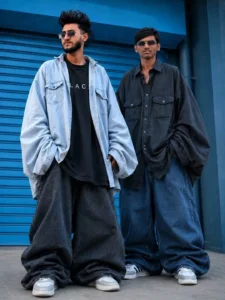
Prompt:-
“Automatically transform the clothes on the person in the uploaded photo into an EXTREME oversized, massive, and baggy 'jhula dhala' fashion outfit. The Al must NOT require any reference image; only use the clothes already visible on thesubject.Transformation Rules:Top/Shirt: Make the top 4X-6X larger than the actual body. Sleeves must be extremely wide, puffy, and hanging well below the hands. Bottoms/Pants: Make the pants ultra-wide, heavily oversized, balloon-style, and bunched/stacked near the feet. Fabric: Add huge fabric volume, dramatic loose folds, and a droopy/ chunky silhouette so the outfit looks comically large but naturally draped.Preservation: Strictly preserve the person's real face, hairstyle, skin tone, pose, body angle, and background exactly as they are.Keep the original clothing style and color theme identical to the original image.”
How to Create an Image Using ChatGPT
Creating an image with ChatGPT is simple and only takes a few steps. Start by copying the image prompt you want to use. Then, open the ChatGPT app or website and look for the Create Image feature, which is usually displayed near the chat input area. Select this option to begin.
Next, tap the + (Plus) icon to upload a reference photo. For the best results, choose a clear image where your face is fully visible and well-lit. Once your photo is uploaded, paste the copied prompt into the text box.
After everything is ready, click the Generate button. ChatGPT will process your request and create a customized image based on your prompt and reference photo. Within moments, you’ll receive a high-quality result that looks creative and visually appealing.
Conclusion
Making unique Instagram-style edits has never been easier. By following the steps above, you can create eye-catching images in just a few minutes. We have covered the entire process to help you get started without any confusion. Try creating your own version, share it on social media, and pair it with a fun audio track to make it even more engaging. Your creative post could easily grab attention and entertain your audience.