Double Exposure Ai Photo Editing Prompts: Double-exposure AI photo editing has become one of the hottest trends on Instagram. Content creators, travelers, and photography enthusiasts are using this creative style to produce eye-catching images that attract attention and engagement. If you have been scrolling through Instagram lately, chances are you have already seen this viral editing technique.
The best part is that creating these stunning images is now easier than ever. In this guide, you will learn how to make your own double-exposure photos using AI tools. We will walk through the complete process, explain the concept behind the trend, and show you how to achieve professional-looking results. If you want to create unique social media content that stands out, keep reading because everything you need to know is covered below.
Understanding Double Exposure AI Photo Editing
This editing style is perfect for people who love travel photography and creative visual effects. The idea is to blend two different elements into a single image while maintaining a clean and artistic appearance.
Typically, you start by choosing a location that inspires you. It could be a famous landmark, a dream destination, or any scenic place you would love to visit. That location is then merged with your portrait to create a layered effect. The background scene appears softly within the composition, while your facial features remain sharp and clearly visible.
The result is a visually striking image where both the destination and the portrait work together as one creative artwork. While the concept may sound complex at first, it becomes much easier to understand once you see a completed example. If you have already noticed this trend on social media, now is the perfect time to create your own version and join the movement.
What Do You Need for This Editing Style?
Before you begin, make sure you have the essential elements required for creating a high-quality double-exposure photo.
First, you will need a well-written AI prompt, which helps the editing tool generate the desired effect. The prompt allows you to customize important details, including the background location and overall visual style.
Next, select a clear portrait photo of yourself. For the best outcome, choose an image where your face is fully visible, properly lit, and captured in high definition. A high-quality source photo will significantly improve the final result.
Finally, you will need a reliable AI image-generation tool capable of producing detailed and realistic edits. Combining a strong prompt, a quality portrait, and the right AI platform will help you create a professional-looking double-exposure image that is ready to share on Instagram and other social media platforms.
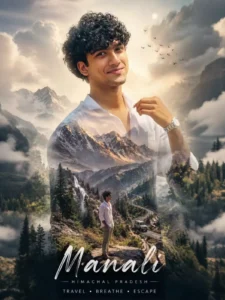
Prompt:-
“Create a cinematic double-exposure travel poster for “Manali, Himachal” using my uploaded photo. Keep the same face, pose, outfit, sunglasses, and natural features unchanged. Blend Himalayan valleys, pine forests, misty mountains, winding roads, rivers, and clouds inside the portrait silhouette. Add a small full-body version beside a scooter/bike on a mountain road. Style: luxury Himalayan tourism campaign, dreamy matte tones, soft fog, atmospheric depth, realistic blending, minimal typography, clean white background, ultra-realistic editorial aesthetic. Text: “Manali”. “Himachal”. “TRAVEL• BREATHE• ESCAPE”
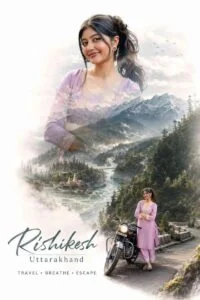
Prompt:-
“Create a cinematic double-exposure travel poster for “Rishikesh, Uttarakhand” using my uploaded photo. Keep the same face, pose, outfit, and natural features unchanged. Blend Himalayan valleys, pine forests, misty mountains, winding roads, rivers, and clouds inside the portrait silhouette. Add a small full-body version beside a bike on a mountain road. Style: luxury Himalayan tourism campaign, dreamy matte tones, soft fog, atmospheric depth, realistic blending, minimal typography, clean white background, ultra-realistic editorial aesthetic. Text. “Rishikesh” “Uttarakhand”. “TRAVEL • BREATHE • ESCAPE” don’t change face”
How to Generate an Image Using ChatGPT
Creating an image like this is simple and takes only a few steps. First, find the prompt provided in this article and copy the one that best matches the style you want to create. Once you’ve copied the prompt, open ChatGPT or any AI image-generation tool you prefer. While ChatGPT is one of the most popular options available today, you can use other advanced tools as they become available in the future since the prompt will still work with minor adjustments.
After opening the tool, paste the prompt into the image generation box and click the “Create Image” button. The AI will analyze the prompt and generate a high-quality image based on your instructions. Within a few moments, you’ll receive a detailed and visually appealing result that closely matches the style described in the prompt.
Conclusion
You can use the same method to create trending Instagram-style edits and creative AI-generated images. By following the steps explained above, you’ll be able to produce impressive results with minimal effort. If you need additional guidance or want to learn more editing techniques, feel free to reach out. We’ll be happy to provide more detailed instructions and help you achieve even better results.